 Try this styleon your selfie · free
Try On Hair Colors Virtually Before You Commit
Published September 23, 2026
Skip the dye-job regret, virtual try-on lets you test drive every shade risk-free before you ever touch a bottle.
Why Virtual Try-On Beats Imagination
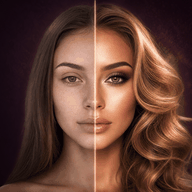
Here's the uncomfortable truth: most of us are terrible at picturing ourselves with different hair. We imagine a celebrity's copper or a friend's platinum on our own face and assume it'll translate, then end up surprised, sometimes pleasantly, often not. Virtual try-on closes that gap by rendering the actual color onto your actual face, with your skin tone, your eyes, and your features in the frame. Instead of guessing, you're looking at a realistic preview of the result. This matters most for big changes, where the cost of being wrong is a long, expensive, hair-damaging correction process. A few minutes of virtual testing can save you weeks of growing out a shade that looked great in theory and wrong in reality.
What You Can Actually Learn From a Preview
A good virtual try-on reveals things that swatches and reference photos simply can't. You'll immediately see whether a tone is warm or cool enough for your complexion, whether it brightens your face or drains it, and whether the shade makes your eyes pop or fade. You can compare a golden blonde against an ash blonde side by side on the same photo and finally understand why one looks expensive on you and the other looks washed out. You can also gauge how dramatic a change really is, sometimes a color you were nervous about turns out to be perfectly wearable, and sometimes a "safe" choice reads bolder than expected. It's the difference between a vague hope and an informed decision you can actually take to your colorist.
How to Get an Accurate Result
The quality of your preview depends entirely on the quality of your input photo, so set yourself up well. Use natural daylight, ideally facing a window, and avoid the warm glow of indoor bulbs or the false flattery of beauty filters, both distort color badly. Pull your hair back or keep it simple so the tool reads your hairline clearly. Face the camera straight on with a neutral expression and no heavy makeup, since dramatic makeup changes how a shade reads against your skin. Take the photo at roughly chest-up framing so your face and shoulders are both visible, which helps you judge the color in context. One clean, honest, well-lit selfie produces a far more trustworthy preview than five glamorous but filtered ones.
Building a Shortlist Without the Damage
The smartest way to use virtual try-on is to treat it as a no-stakes audition round. Start broad: test a warm option, a cool option, something lighter, and something darker than your current color to see which direction your face prefers. Then narrow to two or three finalists and compare them carefully. With GlowMaxing you can preview multiple hair colors on your own selfie in minutes, flipping between, say, a honey balayage and a cool espresso to see which one genuinely flatters you before a single strand gets touched. This lets you explore bold ideas you'd never risk in real life, jewel-red, silver, deep auburn, and discover your range, all without a drop of bleach or a single regretful three-hour salon appointment.
Taking Your Preview to the Salon
Virtual previews are most powerful when they become a communication tool. Colorists hear "I want to go blonde" constantly, and that phrase means a hundred different things. Walking in with a clear visual of the exact tone you're after, rendered on your own face, removes the guesswork and the gap between what you said and what you meant. Save your two favorite previews and show them at your consultation, then ask your colorist what's realistically achievable given your starting color and hair health. They may tell you it takes more than one session, or suggest a tweak to suit your undertone. Either way, you're collaborating from a shared, concrete picture instead of a vague description, which dramatically lowers the odds of leaving disappointed.
Knowing the Limits of a Virtual Try-On
Virtual try-on is a fantastic planning tool, but it's a preview, not a promise, so keep your expectations honest. It shows you how a color reads on your face; it can't account for your hair's current condition, porosity, or how much lift your starting shade will actually allow. Someone with dark, previously-dyed hair won't reach an icy platinum in one visit no matter how good the preview looks, and at-home results vary with technique and product. Use the preview to choose a direction and fall in love with a tone, then lean on a professional for the chemistry of getting there safely. Think of it as the casting call: it tells you who looks right for the role, while your colorist handles the actual production.
The quick checklist
- Use virtual try-on to see real shades on your real face, not your imagination
- Shoot your reference selfie in natural daylight with no beauty filters
- Pull hair back and face the camera straight on for an accurate read
- Test a warm, cool, lighter, and darker option, then narrow to finalists
- Compare your top two shades side by side to spot the most flattering one
- Bring your favorite preview to your colorist for a clearer consultation
- Remember previews show tone, not your hair's lift potential or condition
✦ Free to start✨ Try these looks on your own selfie with GlowMaxing →Upload one selfie and try any hairstyle, color or makeup look instantly with AI. Free to start.Download on theApp Store